

Prompting is not a workflow. Most people confuse the two.
If you open ChatGPT, type a question, copy the answer, move to the next tab, type a different question, and copy that answer too, you are not running an AI workflow. You are doing manual work with a very fast assistant.
This is how most professionals use AI today. They get better at writing prompts, individual outputs improve, but the actual time they spend does not drop. The bottleneck just shifts. Instead of writing everything yourself, you are now managing everything an AI produces. Same effort, different label.
The real shift happens when you move from prompting to orchestration. When you stop asking AI to help you one task at a time and start designing systems where AI tools have defined roles, structured inputs, and clear handoff rules. When the system runs and you direct it.
This post breaks down what an AI-conducted workflow is made of, and what it looked like in practice when we rebuilt Square Root SEO from Version 1 to Version 2.
What this post covers: An AI-conducted workflow is a designed system where AI tools are assigned specific roles and connected through structured inputs and handoff rules, not used one prompt at a time. This post is for founders, creative directors, and marketers who want to move past manual AI use and build systems that produce consistent output. It includes a five-layer anatomy and a real case study from the Square Root SEO rebrand.
Table of Contents
The Prompting Trap
The common belief is that if you write better prompts, you get better AI outputs. That is partially true. But it misses a larger problem.
Good prompting is still manual thinking applied one step at a time. You write a prompt. Review the output. Write another prompt to refine it. Copy the result. Move to a different tool. Write another prompt there. At every step, you are the connector. You are the memory. You are the handoff between tools.
There is no system here. It is a sequence of manual tasks where AI does individual heavy lifting, but you carry the whole structure in your head.
Where many professionals get stuck: they get good at prompting, outputs improve, but they are still doing the same amount of mental work. They have upgraded the tools but not the architecture.
This is the prompting trap. You get faster at the execution layer but stay stuck at the system layer. And no amount of clever prompting solves a structural problem.
Why This Breaks at Scale
Manual prompting works fine for small, one-off tasks. The problems show up the moment you try to repeat, scale, or hand the work off to someone else.
Context loss between sessions. Most AI tools have no memory across conversations. Every new session starts from zero. If you are building a brand campaign, a content series, or a multi-step deliverable, you re-explain context every single time. That adds up to hours of invisible overhead per week. It is a cost nobody measures because it looks like normal work.
Inconsistent output quality. When every prompt is written fresh, the tone, depth, and format of outputs vary. One day the draft sounds formal. The next one sounds casual. Without a system, quality control becomes your permanent full-time job.
Single point of failure. If you are the only person who knows which tools to use, in what order, and what prompts to run, nothing works without you. Your AI stack is not a business asset. It is a personal dependency that cannot be scaled or delegated.
According to McKinsey’s State of AI 2024 report, 72% of organizations have adopted AI in at least one business function. But only a fraction report consistent, repeatable value from those implementations. The gap is almost always workflow design, not tool selection.
The Stanford HAI AI Index 2025 reinforces this point. The report notes that the distance between AI adoption and measurable business impact often comes down to whether organizations have integrated AI into structured, multi-step workflows or are still using tools in isolation.
More tools do not fix this. Better prompts do not fix this. The problem is structural, and it needs a structural answer.
What AI Orchestration Actually Means
AI orchestration is the practice of assigning specific AI tools to specific roles in a workflow, with clear inputs, outputs, and handoff rules between each step. The goal is to remove yourself as the manual connector between every tool and every output.
Snapshot: What Makes a Workflow "Orchestrated"
This is different from automation. Automation removes humans from repetitive tasks entirely. Orchestration is about deciding consciously where humans stay in the loop and where they step back. Both are intentional design choices.
Think of it like a film production. A director does not operate the camera, mix the sound, and write the score at the same time. Each role is assigned. Each person knows what they deliver and when. The director holds the vision and makes decisions at key moments. An AI-conducted workflow works the same way. You are the director, not the crew.
The Five Layers of an AI Workflow
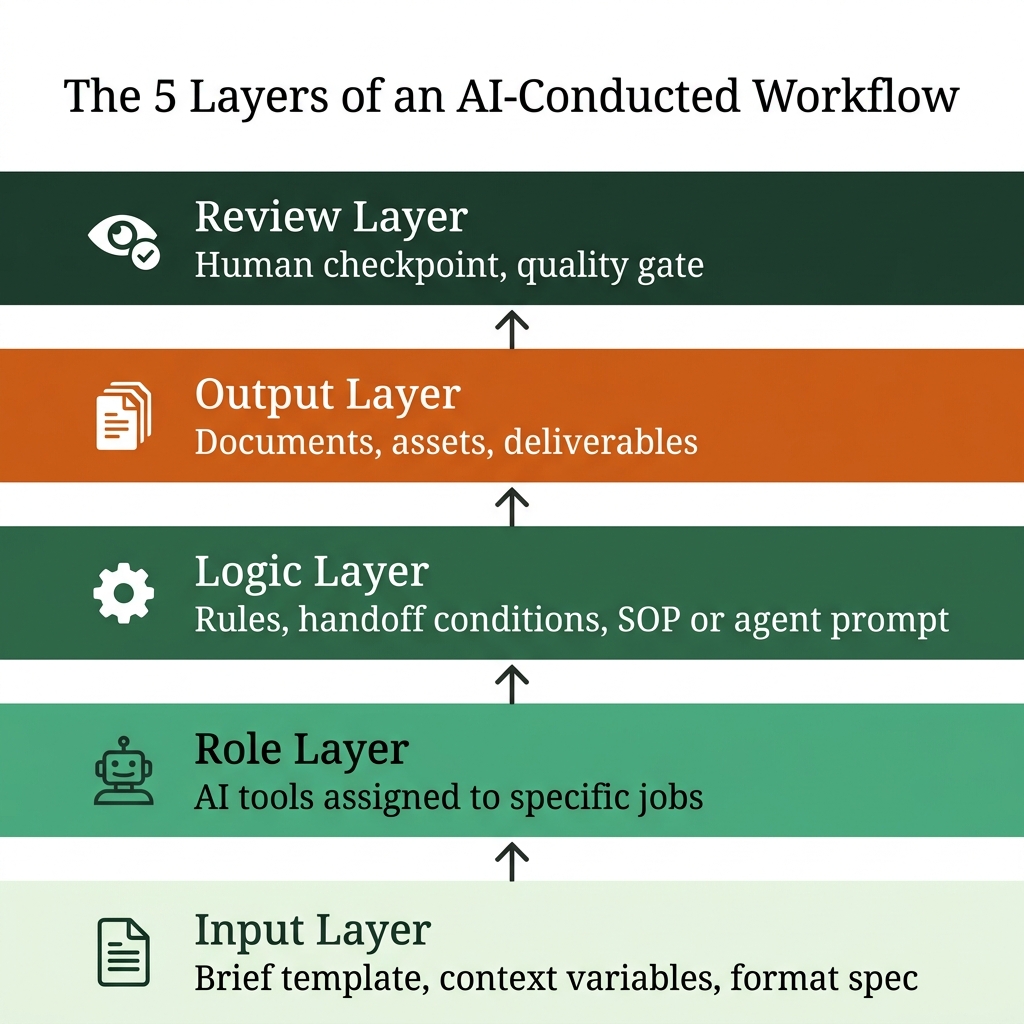
A well-built AI-conducted workflow has five distinct layers. These are not steps in a linear sequence. They are functional layers that work together to hold the system up.
Layer 1: Input Layer
This is where the work begins. The input layer defines what goes into the system: a brief, a dataset, a content topic, a client request. The quality of this layer controls everything downstream. Weak input means weak output, regardless of how good the AI tool is.
A well-designed input layer has a brief template that includes the goal, audience, constraints, and format spec. This template is saved once and reused every time. Not rewritten. Not typed fresh per session. The same brief, passed in as context at the start of every workflow run.
Layer 2: Role Layer
This is where AI tools are assigned specific jobs. One tool for research. One for drafting. One for visual direction. One for SEO review. One for copy checks.
The most common mistake is using one tool for everything in a single thread. When ChatGPT writes, edits, researches, and generates ideas all in one conversation, you produce no structure worth repeating. Role separation is what makes a workflow repeatable and teachable to others.
Layer 3: Logic Layer
This is the decision layer of the workflow. It defines what happens after each step is done: what triggers the next step, what conditions must be met before moving forward, and what gets reviewed before output is accepted.
For simple workflows, the logic layer is a written SOP. For complex ones, it might be a Claude Code agent or an automation tool like n8n or Make. The important thing is that this logic lives somewhere outside your head. If it is only in your memory, it leaves when you do.
Layer 4: Output Layer
This is where deliverables are produced: a blog post, a brand document, a social media calendar, a pitch deck, a client report. The output layer also defines the file format and where the output goes, a shared folder, a CMS, a client Notion workspace.
Layer 5: Review Layer
This is the human checkpoint. Not every output needs a full review. Routine drafts can move straight to a staging area. But high-stakes work, client-facing deliverables, and brand content need a human eye before they go out.
The review layer is a quality gate, not a correction station. If you are spending most of your time here rewriting outputs, your Role Layer or Logic Layer has a gap. Fix it there, not at review.
Real Case Study: Square Root SEO Rebrand
The clearest example I can point to from my own work is the Square Root SEO rebrand from Version 1 to Version 2.
Version 1 was a standard branding exercise. A logo, a color palette, a website with copy. The tools used were completely disconnected. Copy written in Google Docs. Logo made in Canva. Site built on WordPress. Each piece done separately, reviewed separately, published with no underlying system connecting them.
The result looked like a brand. But it did not behave like one. Messaging was inconsistent across pages. The visual style did not carry through all channels. And every update required starting from scratch because there was no workflow, just separate files and separate decisions made every time.
For Version 2, we designed the process before we designed the brand.
Snapshot: Square Root SEO. V1 vs V2 Workflow
Version 1. Manual
- Separate tools with no connection
- Fresh decisions every session
- Context re-explained each time
- One person managing all handoffs
- No repeatable output standard
- Updates required starting over
Version 2. Orchestrated
- Single brand brief as source of truth
- Each AI tool assigned one role
- Outputs feed directly into next step
- Three fixed review checkpoints
- Consistent output standard across steps
- Workflow runs again without re-explaining
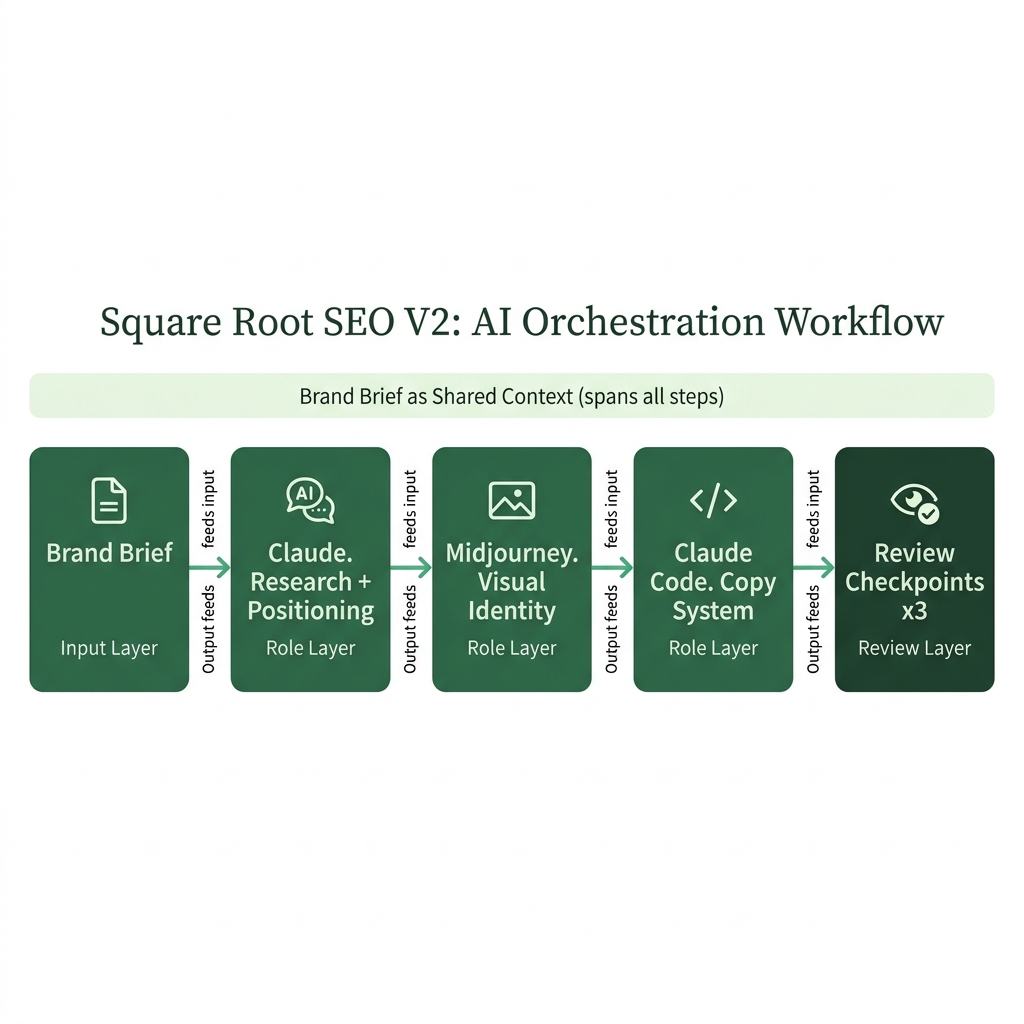
Here is what the Version 2 workflow looked like step by step.
Step 1: Brand Brief (Input Layer). A structured brief was prepared covering positioning, target audience, competitor references, tone of voice, and a full deliverables list. This document became the single source of truth for every AI tool that followed. It was not rewritten per session. It was passed in as context at the start of each step.
Step 2: Research and Positioning (Role Layer). Claude was used for competitive analysis and positioning work. Each run used the same brief as the base context. Outputs were consistent and comparable across sessions because the input was consistent.
Step 3: Visual Identity Direction (Role Layer). Midjourney was briefed using the tone and visual references from Step 2’s output. The brief was not written fresh. It was structured from the brand document that already existed, so visual direction stayed connected to the positioning work.
Step 4: Copy and Content System (Role Layer). Claude Code with a custom skill set handled all brand copy: website headlines, service descriptions, case study formats, and blog templates. Each skill was written once and reused. Not rewritten per project.
Step 5: Review and Approval (Review Layer). Final review happened at three checkpoints: after positioning, after visual identity, and after copy. Each checkpoint had a fixed review brief with clear criteria. The review was structured, not based on whoever had an opinion that day.
How to Start Building Your Own AI Workflow
You do not need to design a complete system on day one. Start with one task you do at least once a week and build a workflow around only that.
Pick a repeatable task. Writing a client brief. Drafting a weekly content plan. Generating a progress report. Anything you do regularly is worth systematizing. One task is enough to start.
Write the input brief once. Define what information needs to go in: the goal, the audience, the constraints, the output format. Save this as a template. Use it every session. Stop rewriting context from scratch.
Assign one AI tool to one job. Do not let your drafting tool also do your research. Separate the roles even if it means two steps instead of one. The extra structure pays off the moment you try to hand this off to someone else or run it again six months later.
Write down the handoff rule. Decide what the output of Step 1 needs to look like before Step 2 can use it. Write this rule down, even if it is one sentence. That is your logic layer.
Add one review checkpoint. Decide in advance what you will check and what you will let pass without review. Do not treat everything at the same depth.
If you want a practical framework to start from, I have outlined the full AI orchestra workflow structure at byharshal.com/resources/ai-orchestra-workflow.
Key Takeaways
- Prompting is a skill. AI orchestration is a system design practice. They solve different problems at different layers.
- An AI-conducted workflow has five layers: Input, Role, Logic, Output, and Review. Skipping any layer creates inconsistency that compounds over time.
- The most common mistake is using one AI tool for all tasks in a single session. Role separation is what makes a workflow repeatable.
- Context loss between sessions is the largest hidden cost in manual AI use. A saved brief template fixes this without any automation tool.
- The review layer is a quality gate, not a correction station. If you are rewriting outputs at this stage, the problem is in the earlier layers.
- You do not need complex automation to start. A written SOP and a saved brief template are enough for most solo and small team workflows.
Frequently Asked Questions
What is the difference between AI prompting and AI orchestration? +
Prompting means using an AI tool to get a single output through a typed conversation. Orchestration means designing a multi-step workflow where different AI tools handle different roles, and the output of one step becomes the structured input for the next. Prompting is a skill. Orchestration is a system design practice. You can be excellent at both, but they solve different problems.
Do I need coding or automation tools to build an AI workflow? +
No. A basic AI-conducted workflow can run entirely through saved brief templates and a written SOP. Tools like n8n or Make can make complex workflows more efficient, but they are not a starting requirement. Most of the value in an orchestrated workflow comes from the design decisions, not the tooling. Start with a document, not a platform.
How many AI tools do I need in one workflow? +
There is no fixed number. A simple workflow might use two tools. A complex one might use six or seven. The rule is one tool, one role. Do not assign multiple jobs to the same tool in the same workflow step unless that tool is specifically built to handle both. More tools without role clarity creates the same problem you started with.
Can a solo founder or small team use AI orchestration? +
Yes. This is actually where it creates the most visible value. When one person is doing the work of a larger team, a well-designed AI workflow multiplies output without multiplying hours. The Square Root SEO rebrand case study above is an example of this done by a small team with a clear workflow design.
What should I do if my AI outputs are inconsistent across sessions? +
Inconsistency almost always means the Input Layer is weak. The fix is to write a proper brief template that includes brand voice, audience context, goal, and output format. Save it. Use it every single session. Consistent inputs produce consistent outputs. This single change fixes most quality consistency problems without any other tool changes.
Harshal Saraf is a Creative Director and AI Workflow Consultant based in Indore, India. Under his practice ByHarshal, he sets up AI workflows for founders, agencies, and brands across India. Where Creative Direction Meets AI Orchestration. He has led creative direction for brands and small and medium scale B2B businesses, and currently works as Creative Director and AI Strategist at Square Root SEO. He writes Oh, So AI, a Tuesday and Friday newsletter on AI tools, workflows, and productivity for founders and creatives.
