

A founder I know set up an autonomous AI agent to handle his content pipeline in March. He gave it a brand voice document, pointed it at his CMS, and let it run. Three days later he had 47 published pieces, none of which he had reviewed. Half the facts were wrong. Two articles contradicted each other on the same product feature. One had a competitor’s name in the meta title. He called it the AI content apocalypse. I called it a predictable result of confusing speed with management.
The debate around autonomous AI agents vs AI orchestration has gotten loud this year. Most of the noise comes from people who tried an agent, got burned, and concluded that AI is overhyped. The actual lesson is simpler: autonomous agents are fast employees, not executives. They execute well. They decide poorly. You still have to manage them.
What this post covers: The real difference between autonomous AI agents vs AI orchestration, why agents fail without a human direction layer, and how to build a content or business workflow where AI does the execution while you remain in control. Written for founders, creative directors, and agency operators who have tried AI tools and want consistent, reliable outputs.
Table of Contents
Autonomous AI Agents vs AI Orchestration: The Core Distinction
Autonomous AI agents and AI orchestration are not the same thing, and confusing them is expensive.
An autonomous AI agent is a software system that takes a goal, breaks it into sub-tasks, and executes those tasks using a set of tools, without human review between steps. It can call APIs, read files, write code, generate content, search the web, and loop back to check its own output. Frameworks like LangChain, CrewAI, and Anthropic’s agent architecture have made it much easier to spin up multi-step agent workflows in days rather than months.
AI orchestration is something different. It is the design layer that sits above the agents. It defines what tasks the agents receive, what tools they can access, when their outputs are reviewed, and what conditions must be met before a result moves to the next step. Orchestration includes the human checkpoints, the brief structures, and the stopping conditions that agents alone do not have.
The appeal of autonomous agents is obvious. You hand off a task, walk away, and come back to a completed output. That workflow is real. It works. The problem is that agents run at their own speed, not at the speed of your judgment. And judgment is not something they have.
According to Gartner’s 2024 AI Hype Cycle report, agentic AI moved into mainstream experimentation faster than any previous AI category in the preceding five years. The adoption curve is steep. The failure rates from mismanaged deployments are equally steep, and almost always trace back to the same root cause: someone gave an agent a job that required a manager, not just an executor.
Why Agents Break Without an Orchestrator
The failure mode is not unique to AI. It is the failure mode of any employee left without a manager.
When autonomous agents go wrong, they go wrong in one of three ways. First, they hallucinate with full confidence. An agent writing market research will cite statistics that do not exist and format them correctly, making them look credible. Second, they drift from the brief. Agents are built to complete tasks, not to stay faithful to an original instruction. After ten chained steps, the output often bears only surface resemblance to what you asked for. Third, they loop. Without a clear stopping condition, agents retry a failed step repeatedly, burning tokens and producing nothing useful.
This is exactly what happens when an agent handles an entire content pipeline without a review layer. The agent gets stuck cycling through its own broken output, generating garbage on repeat because nothing in the system tells it to stop and wait for a human to look at the work.
According to research published by MIT’s Computer Science and Artificial Intelligence Laboratory in 2024 on multi-agent collaboration systems, error rates compound across steps. A single agent with 90% accuracy per step produces correct output only about 35% of the time after five chained steps. That is not a technology limitation. It is a systems design problem, and the solution is orchestration, not better prompts.
The practical implication: every autonomous step in your workflow is a point where errors can silently accumulate. The further you get from human review, the more those errors compound into something that looks complete but is wrong in ways that are difficult to catch after the fact. You can read about how these failure patterns map to real production pipelines on the ByHarshal blog.
The Orchestrator Role: What It Actually Means
The orchestrator is the human, or the human-designed system, that sits above the agents and controls the flow of work.
This is not about reviewing every sentence. It is about setting the conditions under which agents operate, and building checkpoints into the workflow where errors are caught before they compound. If you think of an AI workflow as a kitchen, the agents are the line cooks. Fast, skilled, capable of excellent output. The orchestrator is the head chef. Without the head chef, you get food. You do not get a restaurant.
At ByHarshal, I build AI workflows for B2B content operations, client onboarding, and research synthesis. In every case, the workflows that produce reliable output share one design principle: the human decides what gets passed forward. The agent does not graduate its own work.
Orchestration in practice means four things:
Input control. Briefs that constrain agent behavior precisely, not just describe tasks in general terms. The difference between “write a product explainer” and a 300-word structured brief with tone rules, forbidden phrases, named audience, required claims, and exact length targets.
Stopping conditions. Every agent task needs a defined endpoint before it starts. Not “keep refining until good,” but “produce one draft, write it to the review folder, stop.” This single design choice eliminates most loop problems.
Review gates. Before any agent output goes into a permanent system, something checks it. Published content, sent emails, committed code. All of it passes through a human or a rule-based validator.
Output logs. A record of what each agent produced, at which step, under which instructions. Logs let you identify when an agent starts drifting and trace exactly where things went wrong.
For a structured walkthrough of how these four elements connect in a full production workflow, the AI Orchestra Workflow resource at ByHarshal covers the exact design approach.
How to Structure a Human-in-the-Loop AI Workflow
Human-in-the-loop has become a compliance phrase. Strip it down and it means one thing: before output moves to the next stage, something checks it.
Here is the structure I use for content workflows. You can adapt it for any multi-step AI process.
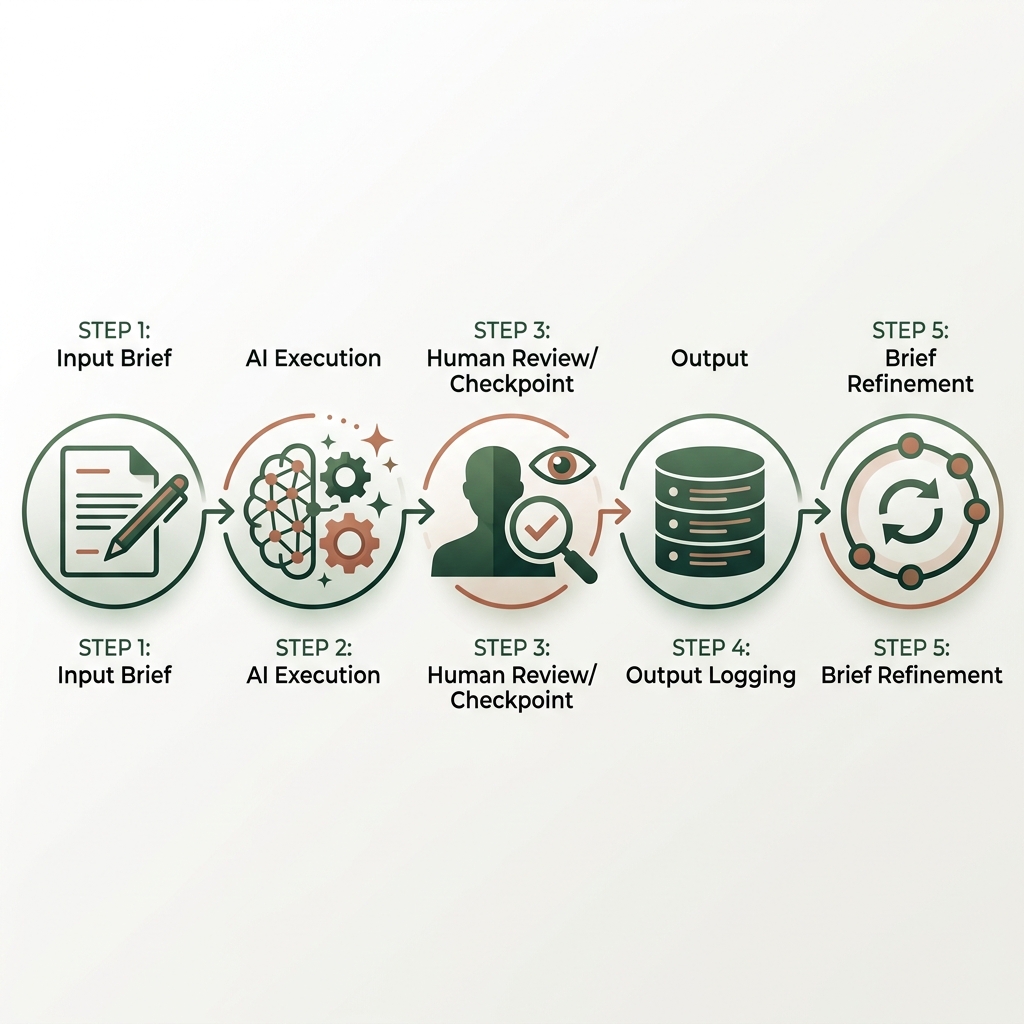
Step 1: Write a constraining brief. Vague instructions produce vague output. Instead of “write a blog post about AI agents,” build a structured brief that specifies audience, tone, required sources, forbidden words, target length, and the specific claims to include or exclude. Embed your brand voice document directly in the system prompt, not as a reference the agent is supposed to find on its own.
Step 2: Set a hard stopping condition. Every agent task should have a defined end state. “Stop after one draft. Output to review folder. Await human approval.” This is the most important change you can make to eliminate runaway loops and uncontrolled token spend.
Step 3: Read before you pass. Review the output before it goes anywhere. Flag what is wrong. Feed corrections back into the next prompt as specific instructions, not general feedback like “make it better.” Reading 600 words of AI output takes four minutes. Recovering from 47 published hallucinated articles takes weeks.
Step 4: Log every output. Keep a timestamped record of what each agent produced, at each step, under each instruction set. This is how you catch drift over time and improve the workflow rather than re-running broken steps hoping for a different result.
Step 5: Fix the brief, not the model. When outputs are consistently off, the problem is almost never the underlying model. It is the input conditions. A more precise brief produces more consistent output. Adjusting temperature settings or switching models is usually the wrong lever.
Each of these steps is covered in more depth alongside real workflow diagrams in the AI Orchestra Workflow guide.
When Longer Agent Runs Are Safe
Not every workflow needs tight human review at every step. There are cases where longer autonomous runs are appropriate.
Research aggregation is one. If you need an agent to pull 50 articles on a topic, summarize each one, and return a structured document, you can let it run end-to-end. You review the final document. The error surface is contained and the output is easy to validate in one pass.
Data transformation is another. If an agent reformats structured data from one schema to another, and you have a validation step at the end, the intermediate steps do not need human review. The output either passes validation or it fails, and failure is visible immediately.
The key distinction is whether errors at one step compound into the next. If they do, you need a checkpoint between them. If they do not, you can batch the steps and review at the end.
Creative generation, brand copy, strategy documents, and client-facing content are not cases where long autonomous runs work well. The stakes are high, the error surface is wide, and agents are poor judges of their own creative quality. A piece of content that reads fluently is not necessarily correct, on-brand, or safe to publish. That judgment belongs to a human every time.
More on how to decide which parts of your workflow can run longer, and which need tighter human control, is available on the ByHarshal blog.
Key Takeaways
- Autonomous AI agents execute tasks well but do not manage themselves. They need an orchestrator operating above them.
- The three most common agent failure modes are hallucination, brief drift, and infinite loops. All three are preventable through workflow design, not better models.
- MIT’s 2024 multi-agent research shows errors compound across steps: a five-step chain at 90% per-step accuracy produces correct output only about 35% of the time.
- The orchestrator role is about setting input conditions, defining stopping points, building review gates, and logging outputs. Not reviewing every sentence.
- A hard stopping condition on every agent task eliminates most runaway loop problems immediately.
- Precise, constraining briefs produce more consistent output than better prompts, higher temperature settings, or more capable models.
- Client-facing and brand-critical content always requires a human review step before deployment, regardless of how sophisticated your agent setup is.
Frequently Asked Questions
What is the difference between autonomous AI agents vs AI orchestration?
Autonomous AI agents execute tasks independently, chaining tool calls and decisions without human input between steps. AI orchestration is the design layer that controls when agents run, what they receive, and when their output is approved to move forward. Orchestration includes human review gates, brief structures, and stopping conditions that agents alone do not have.
Can I run a content pipeline fully autonomously with AI agents?
Technically, yes. In practice, fully autonomous content pipelines produce high-volume, low-reliability output. For anything client-facing, brand-critical, or factually sensitive, a human review step before publication is not optional. You can automate drafting, formatting, and filing. The sign-off stays with you.
What tools do I need to build AI orchestration?
Orchestration is a workflow design discipline, not a specific platform. Claude, GPT-4o, or Gemini can all serve as the agent layer. What matters is the structure you build around them: the briefs, the stopping conditions, the review checkpoints, and the output logs.
Why do AI agents get stuck in loops?
Loops happen when an agent has an unclear stopping condition and keeps retrying a failed step, or when it treats its task as requiring continuous refinement. The fix is explicit: define what "done" looks like before the agent starts, and build a hard stop into the task definition.
How many agents should I run in a single workflow?
Start with one. Single-agent workflows are easier to debug, cheaper to run, and sufficient for most content and research tasks. Add a second agent only when you have a clear task separation that a single agent cannot handle. Multi-agent systems compound both complexity and error rates.
Harshal Saraf is a Creative Director and AI Workflow Consultant based in Indore, India. Under his practice ByHarshal, he sets up AI workflows for founders, agencies, and brands across India. Where Creative Direction Meets AI Orchestration. He has led creative direction for brands and small and medium scale B2B businesses, and currently works as Creative Director and AI Strategist at Square Root SEO. He writes Oh, So AI, a Tuesday and Friday newsletter on AI tools, workflows, and productivity for founders and creatives.
