

Vibe coding changed how I work with AI. But voice dictation changed how I think.
For a long time, I was typing every prompt I sent to Claude, Cursor, or any automation tool I was building. Short prompts. Trimmed context. Half-formed briefs that made the AI work harder than it needed to. The output was fine. Not great. And I kept revising more than I should have.
Then I started speaking my prompts instead. Everything shifted. Not just in output quality, but in how clear my own thinking became before I even hit generate. I have now dictated over 1,05,400 words using Wispr Flow. Of those, 2,668 were AI prompts. That is 60% of everything I dictated going directly into AI workflows and vibe coding sessions. These are my numbers, and they are honest.
What this post covers: Voice dictation for vibe coding is one of the most underused speed advantages in AI-assisted workflows. This post explains why typing limits your prompts, how speaking changes the quality of your AI communication, and what a voice-first vibe coding setup actually looks like in practice. Written from 12+ years of experience in creative direction and AI orchestration.
Table of Contents
What Vibe Coding Actually Demands
Vibe coding is a term coined by Andrej Karpathy, co-founder of OpenAI, in early 2025. It describes a way of building software where you describe what you want in plain language and let the AI write the code. Instead of writing every function by hand, you focus on intent. The AI handles implementation.
This sounds like a developer workflow. And it is. But the same principle applies to anyone directing AI at scale, whether you are building an automation pipeline, orchestrating a multi-tool content workflow, or prompting your way through a complex creative brief.
The entire model depends on one thing: your ability to communicate intent clearly. The better your brief, the better the output. This is not about clever prompt engineering tricks. It is about giving the AI enough context to get it right on the first pass.
And here is the problem. Most people type their prompts.
Why Typing Slows You Down
The average person types at 40 words per minute. Natural speech runs at 130 to 150 words per minute. That gap matters more than it sounds.
When you type a prompt, you edit as you go. You shorten sentences. You cut the context that felt obvious in your head. You trim the edge cases to save time. The AI receives a compressed version of what you actually wanted to say.
Voice typing works especially well for vibe coding because it removes the friction of manually typing syntax-heavy instructions and allows developers to communicate with AI tools using natural, conversational language. By speaking ideas out loud, developers can brainstorm more freely, iterate faster, and refine prompts without breaking flow.
The same is true outside pure coding. When I am directing an AI automation, the instruction is not just a command. It is a sequence with conditions, fallback behaviour, and expected outputs. That kind of layered brief is hard to type quickly. Speaking it comes naturally.
Typing also breaks focus. You switch between thinking and keyboard mechanics. That gap is small but it compounds over a full working day.
How Voice Changes the Quality of Prompts
Speaking a prompt is different from typing one. When you speak, you do not edit in real time. You explain. You give context. You say the thing you were going to skip.
Developers spend 40 to 50% of their coding time writing prompts for AI assistants. Speaking these prompts is three to four times faster than typing them. The speed benefit is real. But the more important shift is in how complete your prompts become.
When I dictate a vibe coding session, I describe the component I need, the constraints it has to respect, the edge cases I am thinking about, and what I do not want the AI to touch. All in one breath. That is a brief a designer could work from. The AI gets it right far more often on the first pass.
This matters because revision time is the real cost in any AI workflow. One clear spoken prompt beats three typed revisions every time.
Voice also helps with what I call the creative direction layer. AI orchestration is not just about issuing commands. It is about communicating a vision. The tone, the intent, the judgment call that sits behind the instruction. That does not compress well into a typed prompt. It comes out naturally when you speak.
My Wispr Flow Setup and Numbers
I use Wispr Flow as my dictation layer. It works system-wide, meaning I can speak into any app without switching tools. Claude, Cursor, Notion, email, Slack. One voice input across all of them.
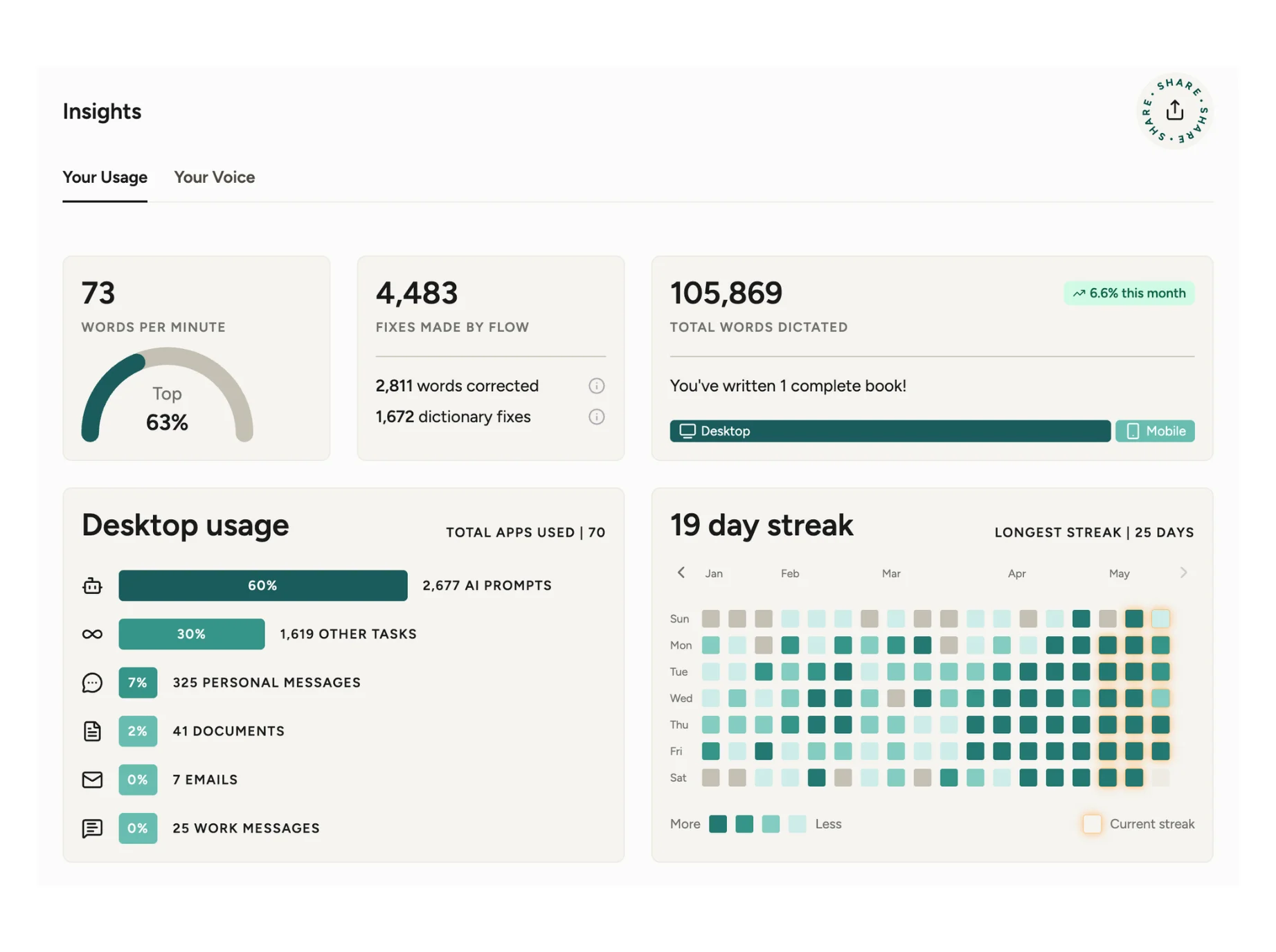
My stats after a few months of consistent use:
- 1,05,400 words dictated total
- 71 words per minute average speed, top 64% of users
- 2,668 AI prompts dictated, which is 60% of my total output
- 19-day current streak, longest streak 25 days
- 4,431 fixes made by Wispr Flow’s auto-edit
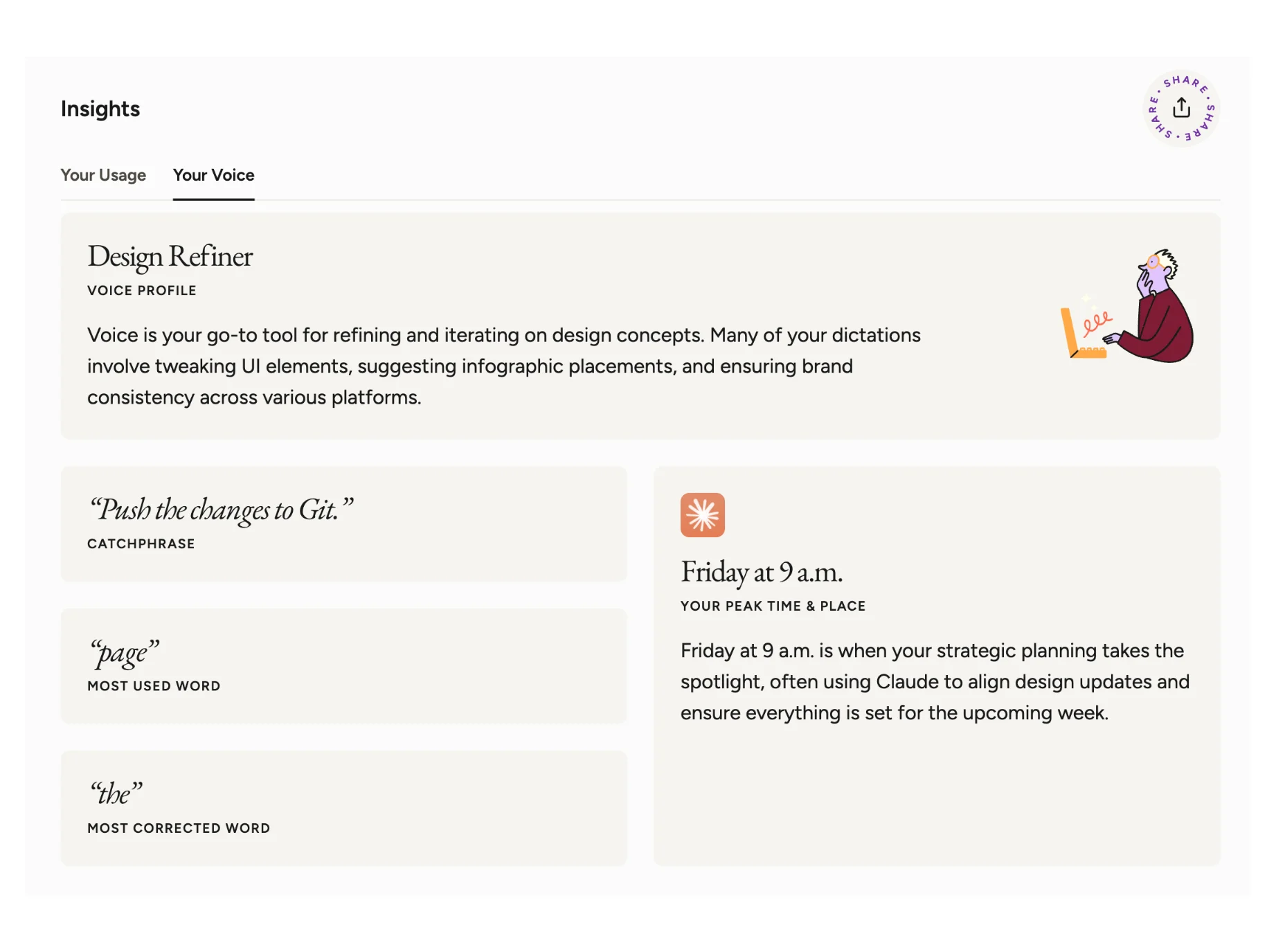
- Voice profile: Design Refiner
- Peak time: Friday at 9 AM
That last one is accurate. Friday mornings are when I plan the week, push updates across tools, and wire automations for the coming days. Voice makes that faster.
Wispr Flow’s auto-edit feature cleans up the rough edges of spoken input. Filler words, run-on structures, small grammar issues. The output that goes into the AI prompt is clean, even when my speech was not perfect. For AI prompting specifically, this is useful. For technical prompts where exact wording matters, I keep the edit mode light and check the output before sending.
The most used word in my dictation: “page.” The most corrected: “the.” That tells you something about how I work. A lot of brief-writing, a lot of content direction, and not enough proofreading before I speak.
How to Start Using Voice for AI Prompting
You do not need a complicated setup. Here is what actually works:
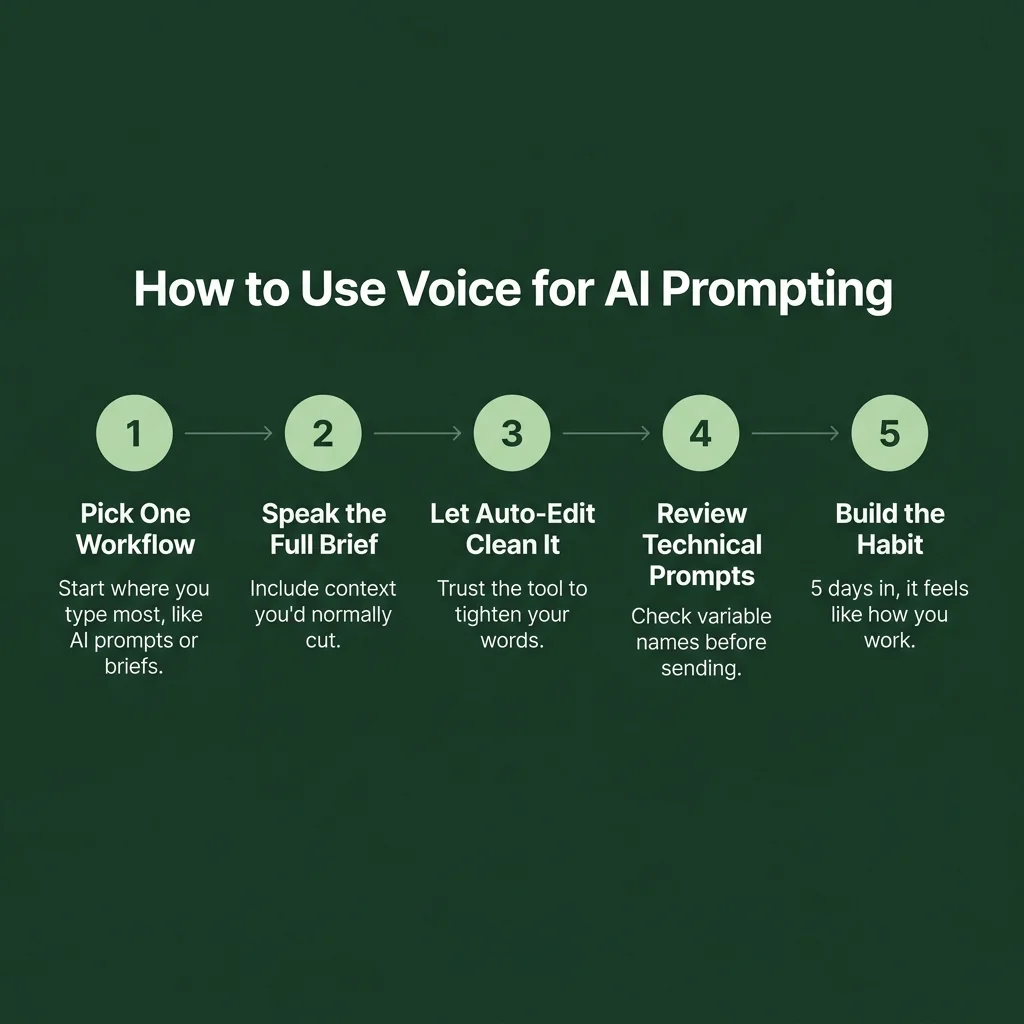
Step 1: Pick one workflow to start with. Do not try to voice-dictate everything on day one. Pick the thing you type most often. For me, it was AI prompts. For a developer, it might be Cursor instructions. Start there.
Step 2: Speak the full brief, not the short version. This is the habit that changes output quality. When you dictate, do not try to be efficient. Say the whole thing. Include the context you would normally cut. Let Wispr Flow clean it up. The AI on the other end will thank you.
Step 3: Use it across apps. The advantage of a system-wide tool like Wispr Flow is that your voice workflow does not break when you switch tools. You are building one muscle, not many. After two weeks, the tool stops feeling like a feature and starts feeling like how you work.
Step 4: Review the auto-edits for technical prompts. For general writing, let the auto-edit run. For vibe coding sessions where you need exact variable names, component references, or specific logic, glance at the output before you send. One second of review avoids a prompt mismatch.
Vibe coding with Wispr Flow is a method of writing code using voice dictation and speech recognition. With it, developers speak natural language instructions or code snippets, and the platform translates speech into accurate text across any app or IDE. Voice coding reduces friction between thought and output by capturing ideas directly from your voice.
That friction reduction is what you are actually paying for. Not the transcription. The thinking time you get back.
Key Takeaways
- Voice dictation for vibe coding closes the gap between thought and prompt. You speak at 130-150 WPM. You type at 40. That difference is where time goes.
- Typed prompts get shortened. Spoken prompts stay complete. Complete prompts produce better AI output on the first pass.
- The creative direction layer, tone, intent, judgment, communicates more naturally through speech than through text.
- A system-wide tool like Wispr Flow means one voice input layer across all your AI tools, from Claude to Cursor to Notion.
- After 1,05,400 dictated words, 60% of which went into AI workflows, the habit compounds. You stop thinking about the tool and start thinking about the work.
Wispr Flow Setup Guide: Transforms, Shortcuts & Pro Tips →
Step-by-step setup, the built-in Polish and Prompt Engineer Transforms, how to build your own custom shortcuts, and a quick reference cheat sheet.
Frequently Asked Questions
Does voice dictation actually work for technical prompts with specific code references?
Yes, with one caveat. Wispr Flow's auto-edit can sometimes rephrase very specific technical instructions. For prompts with exact variable names, file references, or logic sequences, review the transcription before sending. For everything else, the auto-edit saves you more than it costs.
What is vibe coding and how does voice fit into it?
Vibe coding is an AI-assisted development approach where you describe what you want in plain language and let the AI generate the code. It was coined by Andrej Karpathy in February 2025. Voice fits naturally into this model because the whole workflow depends on clear natural-language communication. Speaking is faster and more complete than typing.
Is voice dictation only useful for developers, or does it work for other AI workflows?
It works for any workflow where you are directing AI through text input. Content workflows, automation building, SEO briefing, email writing, and design direction all benefit from the same principle: a complete spoken brief produces better output than a compressed typed one.
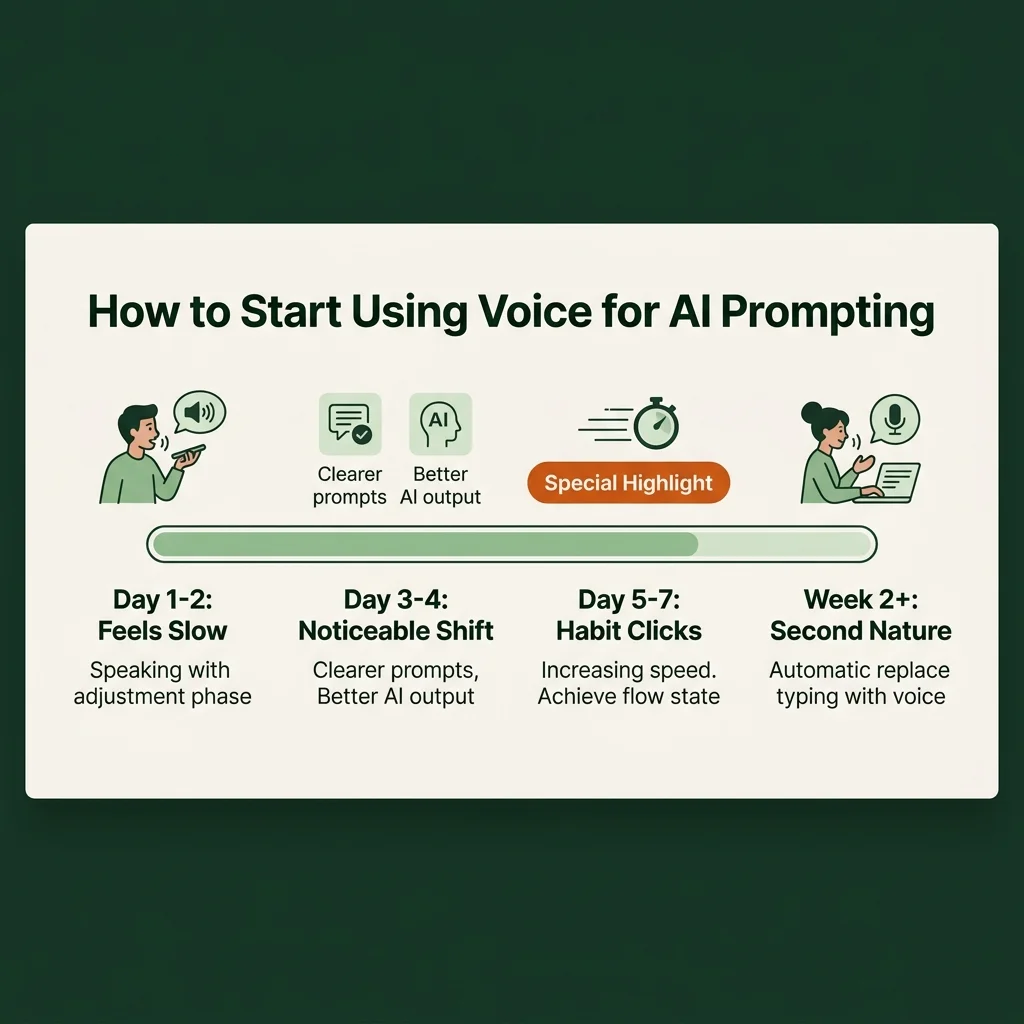
How long does it take to get used to dictating prompts?
Most people feel a noticeable difference within three to four days of consistent use. The first day or two can feel slow while you adjust to speaking rather than typing. By day five, the habit starts to click. Speed picks up quickly after that.
What makes Wispr Flow different from built-in dictation tools?
Built-in dictation on Mac or Windows works within individual apps. Wispr Flow works system-wide, meaning it captures your voice input across every tool without switching modes. It also has context-awareness and auto-edit built in, which cleans up spoken input before it lands in your prompt field.
Harshal Saraf is a Creative Director and AI Workflow Consultant based in Indore, India. Under his practice ByHarshal, he sets up AI workflows for founders, agencies, and brands across India. Where Creative Direction Meets AI Orchestration. He has led creative direction for brands and small and medium scale B2B businesses, and currently works as Creative Director and AI Strategist at Square Root SEO. He writes Oh, So AI, a Tuesday and Friday newsletter on AI tools, workflows, and productivity for founders and creatives.
